

Printhead Maintenance: Maximize Poster Maker Performance
Printhead Maintenance: Maximizing Performance of Your Poster Maker
Keeping your poster maker in top-notch condition significantly depends on effective Printhead Maintenance. Regular Printhead Maintenance not only ensures that your prints remain vibrant and clear but also extends the life of your equipment. In this section, we’ll delve into the common issues that arise with printheads, practical tips for maintaining them, and how you can extend their lifespan, ultimately maximizing your poster maker’s performance.
Common Issues and Signs of Wear in Printheads
Typical Problems with Printheads
Your poster maker’s printhead is a critical component that directly influences print quality. Over time, several issues can emerge, potentially hindering your printer’s performance. Understanding these problems is the first step towards effective Printhead Maintenance.
One common issue is **clogging**, which occurs when dried ink obstructs the microscopic nozzles of the printhead. This blockage leads to incomplete or missing print areas, resulting in streaking or banding across the printed material. Streaking manifests as visible lines or stripes that interfere with the overall image quality, making prints look unprofessional.
Another frequent problem is **color fading** or inconsistency. When printhead nozzles are partially blocked, or ink flow is uneven, the printed colors may appear washed out or different from the expected hues. This issue can severely impact the visual appeal of your posters, banners, or educational materials.
Additionally, mechanical wear and tear can cause **alignment problems**. Misaligned printheads can lead to blurred images or ghosting effects, where a faint duplicate image appears on the print. Such defects not only waste materials but also detract from the clarity and effectiveness of your visual communications.
Early Warning Signs of Printhead Wear
Recognizing the early warning signs of printhead wear is essential for timely Printhead Maintenance. Paying attention to these indicators can prevent minor issues from escalating into significant problems.
Be alert for the following signs:
– Reduced Print Quality: Noticeable decline in print sharpness, with images appearing fuzzy or text becoming less crisp.
– Color Discrepancies: Colors on prints do not match the expected output, or there’s a sudden shift in color balance.
– Streaks and Lines: Unwanted lines running across prints, indicative of clogged nozzles.
– Missing Areas: White spots or gaps where the ink should be, suggesting blockages or ink flow issues.
– Unusual Noises: Strange sounds during printing could indicate mechanical issues with the printhead assembly.
– Frequent Error Messages: The printer displays error codes related to the printhead or requires frequent resets.
By addressing these signs promptly, you can perform necessary Printhead Maintenance before the situation worsens.
Consequences of Ignoring Printhead Issues
Ignoring printhead issues can have serious repercussions on both print quality and the longevity of your poster maker. Persistent problems like clogging or mechanical misalignment can lead to increased wear on the printhead, ultimately shortening its lifespan.
Moreover, neglected Printhead Maintenance can result in:
– Costly Repairs: Severe damage may necessitate professional repairs or even complete printhead replacement, incurring significant expenses.
– Downtime: A malfunctioning printer disrupts workflow, causing delays in producing essential materials.
– Increased Consumable Usage: Poor print quality often leads to reprints, wasting ink and media.
– Voided Warranty: Failure to perform recommended maintenance may void manufacturer warranties, leaving you unprotected.
In cases where the printhead is damaged beyond repair, a replacement becomes necessary. Selecting a high-quality replacement is crucial to restore your printer’s performance. For example, the HP 713 DesignJet Printhead offers reliable output and is designed to work seamlessly with compatible HP printers.
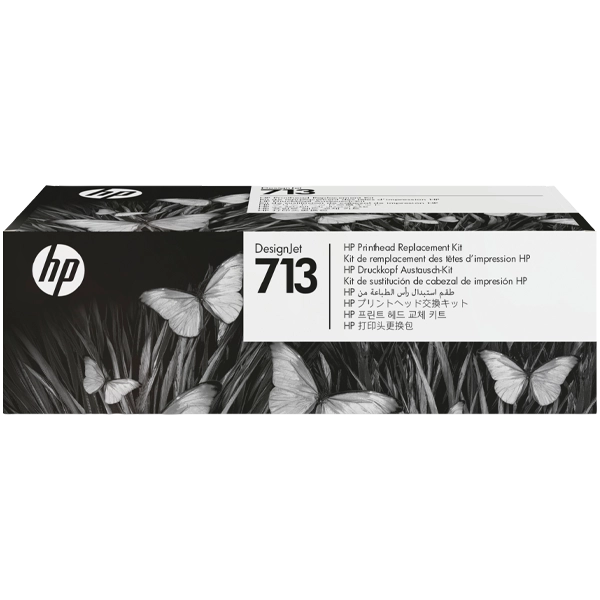
In essence, proactive Printhead Maintenance is crucial to avoid these adverse outcomes and to sustain the efficiency of your printing operations.
Tips for Maintaining and Cleaning Printheads
Routine Maintenance Practices
Implementing routine Printhead Maintenance practices is key to keeping your printheads in optimal condition. Regular care not only enhances print quality but also extends the life of your equipment. Here are some practical tips to incorporate into your maintenance routine:
– Use the Printer Regularly: Frequent use prevents ink from drying up and clogging the nozzles. If the printer remains idle for extended periods, run a test print periodically.
– Keep the Printer Clean: Dust and debris can accumulate on the printhead and surrounding components. Regularly wipe down external surfaces with a lint-free cloth.
– Use High-Quality Ink: Always use the manufacturer-recommended inks or high-quality alternatives compatible with your printer model to ensure optimal performance.
– Update Firmware and Software: Keep your printer’s firmware and drivers up to date to ensure it operates efficiently and incorporates the latest maintenance features.
Step-by-Step Guide to Cleaning Printheads
When print quality declines despite regular maintenance, a thorough cleaning of the printhead may be necessary. Here’s a step-by-step guide to safely clean your printheads:
1. Prepare the Required Materials:
– Distilled water or a specialized printhead cleaning solution.
– Lint-free cloths or paper towels.
– Gloves to protect your hands.
– A small container or tray.
2. Access the Printhead:
– Turn off and unplug the printer to ensure safety.
– Open the printer cover to access the printhead assembly.
– If the printhead is removable, carefully detach it according to the manufacturer’s instructions.
3. Clean the Printhead:
– Dampen a lint-free cloth with distilled water or cleaning solution.
– Gently wipe the printhead nozzle area to remove dried ink and debris.
– For stubborn clogs, you may soak the printhead in a shallow container with the cleaning solution for a few minutes.
4. Dry the Printhead:
– After cleaning, gently dab the printhead with a dry lint-free cloth to remove excess moisture.
– Allow the printhead to air dry completely before reinstalling.
5. Reinstall and Test:
– Carefully reinstall the printhead into the printer.
– Plug in and turn on the printer.
– Run a nozzle check or print a test page to assess the improvement in print quality.
Important: Always refer to your printer’s user manual for specific instructions related to Printhead Maintenance, as procedures may vary between models.
Maintenance Schedule Recommendations
Establishing a consistent maintenance schedule is vital for preventing buildup and prolonging printhead life. Consider the following guidelines:
– Weekly Checks:
– Perform a nozzle check to detect any clogs early.
– Clean the exterior of the printer to prevent dust accumulation.
– Monthly Maintenance:
– Conduct a deep cleaning cycle using the printer’s maintenance software.
– Inspect ink cartridges for expiration dates and replace if necessary.
– Bi-Annual Service:
– Perform a manual clean of the printhead as detailed above.
– Check and update printer firmware and software.
Adhering to this schedule ensures your printhead remains in excellent condition, minimizing downtime and maintaining high-quality print output.
Extending the Lifespan of Your Printhead
Best Practices for Using Your Poster Maker
To reduce strain on the printhead and extend its lifespan, it’s essential to adopt best practices when using your poster maker. Here are some recommendations:
– Use Recommended Inks: Always use inks specified by the manufacturer. Compatible inks ensure the printhead operates correctly and reduce the risk of clogs.
– Proper Shutdown Procedures: When turning off the printer, use the printer’s power button rather than unplugging it. This allows the printer to park the printhead properly, preventing exposure to air and drying out.
– Print in Optimal Settings: Adjust print settings to suit your printing needs. High-resolution printing can consume more ink and strain the printhead, so use standard settings when appropriate.
Environmental Factors Affecting Printheads
Environmental conditions play a significant role in printhead health. Consider the following factors:
– Humidity: Maintain a moderate humidity level (around 40-60%) in the printing area. Low humidity can cause ink to dry faster, leading to clogs, while high humidity may affect ink drying on the media.
– Temperature: Keep the printer in a stable temperature environment, avoiding extreme heat or cold, which can impact ink viscosity and printhead performance.
– Dust and Air Quality: Dust particles can accumulate on the printhead and internal components. Place the printer in a clean area, away from windows or vents that may introduce dust and debris.
Benefits of Regular Maintenance
Investing time in regular Printhead Maintenance offers substantial benefits:
– Cost Savings: Prolonging the printhead’s life reduces the need for costly replacements and lowers overall maintenance expenses.
– Consistent Print Quality: Regular maintenance ensures that your prints maintain high-quality standards, essential for professional presentations and educational materials.
– Increased Efficiency: A well-maintained printer operates smoothly, minimizing downtime and enhancing productivity.
– Sustainability: Proper maintenance reduces waste of ink and media, contributing to environmentally friendly printing practices.
By incorporating these practices into your routine, you not only extend the lifespan of your printhead but also enhance the overall performance of your poster maker.
Conclusion and Recommendations
In conclusion, diligent Printhead Maintenance is paramount for the consistent, high-quality performance of your poster maker. By recognizing common issues and addressing them promptly, you can prevent minor problems from escalating into costly repairs. Implementing routine maintenance practices, adhering to recommended cleaning procedures, and considering environmental factors significantly extend the lifespan of your printhead.
We encourage you to apply the maintenance tips provided, ensuring your poster maker continues to produce vibrant and professional prints. Proper care not only maximizes your equipment’s performance but also enhances the educational experience by delivering crisp, clear, and engaging visual materials.
Regular Printhead Maintenance is a small investment of time that yields substantial returns in efficiency, cost savings, and print quality. Embrace these practices, and enjoy the reliable performance of your poster maker for years to come.