

Amplify Poster Maker: Supercharge Your Large-Format Projects
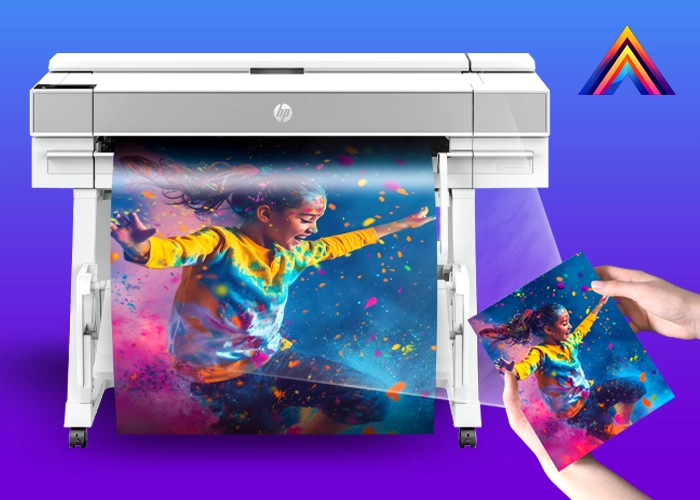
Looking for a game-changing device that prints, scans, and copies all your large-format needs in one place? The Amplify Poster Maker is here to transform your workflow. With high-resolution printing, robust scanning capabilities, and user-friendly controls, the Amplify Poster Maker delivers professional-grade results—perfect for schools, offices, retail spaces, and more.
What Makes the Amplify Poster Maker Special?
The Amplify Poster Maker is an all-in-one solution for big projects—without multiple components or complicated setups. Whether you need to print vibrant posters, scan architectural drawings, or copy oversized documents, the Amplify Poster Maker does it all in a single streamlined device.
- Built-In Large-Format Scanner: Effortlessly digitize teaching materials, artwork, or technical schematics.
- High-Resolution Printing: Get sharp, vivid outputs with up to 2400 × 1200 dpi for crisp text and eye-catching visuals.
- Massive Roll Capacity: Equipped to hold 300-ft rolls, keeping your production line running without constant refills.
To explore all the benefits and features, check out our Amplify Poster Maker page or browse our products for more options.
Key Features of the Amplify Poster Maker
1. Simplified All-in-One Functionality
Forget juggling multiple devices or software. From the convenient touchscreen, the Amplify Poster Maker allows you to print, scan, and copy large formats on the spot, with no additional hardware required.
2. Vibrant Print Quality
Thanks to advanced ink technology and precision nozzles, you’ll see true-to-life colors and razor-sharp lines—ideal for banners, presentation boards, or even fine text as small as 4-point.
3. Seamless Scanning
Scan oversized originals up to 36 inches wide at up to 600 dpi. Save files digitally or use “scan-to-print” to duplicate your documents instantly—perfect for reproducing charts, diagrams, or artwork in multiple copies.
4. Fast & Efficient
Print D/A1-size posters in as fast as 21 seconds. Its large internal memory and high-capacity paper roll let you handle bulky, back-to-back jobs with minimal downtime.
5. Intuitive Interface
Navigate through every function—from changing ink cartridges to scheduling print jobs—using a built-in touchscreen that offers step-by-step guides and real-time previews.
Recommended Applications
- Schools & Classrooms: Design teaching aids, event signage, and sports banners on demand. Scan and archive student artwork or large diagrams with ease.
- Architects & Engineers: Produce precise CAD drawings and technical plans without leaving the office. Copy or digitize large paper originals for long-term storage.
- Retail & Marketing: Print eye-catching displays, promotional banners, and in-store signage for immediate impact.
- Government & Public Sector: Create informative posters for community events, notices, or presentations, all with secure handling of important documents.
- Corporate Offices: Generate conference materials, training posters, and presentation boards quickly—and scale for larger events as needed.
For additional tips on large-format scanning and printing best practices, the Library of Congress offers helpful guidelines on preserving and digitizing large documents.
Frequently Asked Questions
-
Is special software required for the Amplify Poster Maker?
No. The Amplify Poster Maker comes with a built-in operating system and touchscreen controls. Optional drivers are available for popular design programs if you prefer computer-based printing. -
How many ink cartridges does it use?
It uses six individual cartridges to ensure optimal color performance. The printer alerts you when ink levels are low, so you’re never caught off guard. -
Does it support automatic roll switching?
Yes. Some models include dual-roll functionality, allowing you to load two different paper types (e.g., glossy and matte). The printer automatically selects the best roll for each job. -
Can I scan while another print job is running?
Absolutely. With multitasking capabilities, the Amplify Poster Maker can handle simultaneous print and scan requests, depending on the model’s configuration. -
How difficult is maintenance?
Routine tasks like replacing ink cartridges or cleaning printheads are guided through the user-friendly interface. For more complex issues, our remote tech support is included and ready to help.
Why Choose the Amplify Poster Maker?
- Comprehensive Functionality: Print, scan, and copy large-format projects in one device.
- Speed & Quality: Enjoy professional-grade results, even under tight deadlines.
- Eco-Friendly & Cost-Effective: Conserve paper with nesting features and minimize wasted ink through precise color management.
- Simple Upkeep: Easy-to-follow maintenance routines keep downtime low, so you can focus on creating.
Are you ready to supercharge your prints with the Amplify Poster Maker? Do you have questions about specific features or configuration options? Contact us today and let our expert team guide you to the perfect large-format printing solution for your needs. We look forward to helping you bring your biggest ideas to life!