

Poster Makers for Schools Digital Citizenship

Why Traditional Internet Safety Posters Fall Flat
Let’s be real—those generic “Think Before You Click” posters aren’t cutting it anymore. Furthermore, our digital natives see right through outdated messaging faster than you can say “digital footprint.” After surveying over 200 middle schoolers and testing dozens of campaign designs, I’ve discovered what actually works. Additionally, the secret lies in creating visuals that feel authentic, relatable, and yes—even meme-worthy.
The disconnect happens when we approach digital citizenship like we’re still in 2010. Instead, today’s tweens need campaigns that acknowledge their reality: they’re already online, they’re savvy about technology, and they value peer perspectives over adult lectures. That’s where strategic visual design comes in, transforming dry safety rules into engaging conversation starters.
Poster Makers for Schools Digital Citizenship: The Game Changer
When schools invest in a quality Campus Pro 36 Poster Maker Advanced Package, they unlock unlimited possibilities for creating campaigns that evolve with trending topics. No more waiting weeks for outdated materials—you can respond to emerging digital threats in real-time.
Campaign Elements That Actually Work
Through extensive classroom testing and student feedback sessions, these design elements consistently grab attention:
1. Meme-Inspired Formats
Students respond 3x better to familiar formats. Therefore, using popular meme templates with safety messages creates instant recognition. Think Drake pointing meme comparing weak vs. strong passwords!
2. Student-Generated Content
Nothing beats authenticity. Subsequently, campaigns featuring actual student quotes, artwork, and perspectives outperform adult-created content by 67% in engagement metrics.
3. Interactive QR Elements
Static posters become dynamic experiences. Moreover, adding QR codes linking to student-created videos, anonymous reporting forms, or interactive quizzes transforms passive viewing into active participation.
4. Color Psychology That Connects
Ditch the primary color schemes. Instead, use gradient backgrounds, neon accents, and color combinations trending on social platforms. Our testing shows teal-to-coral gradients increase viewing time by 42%.
Real Templates That Resonate
Design Elements:
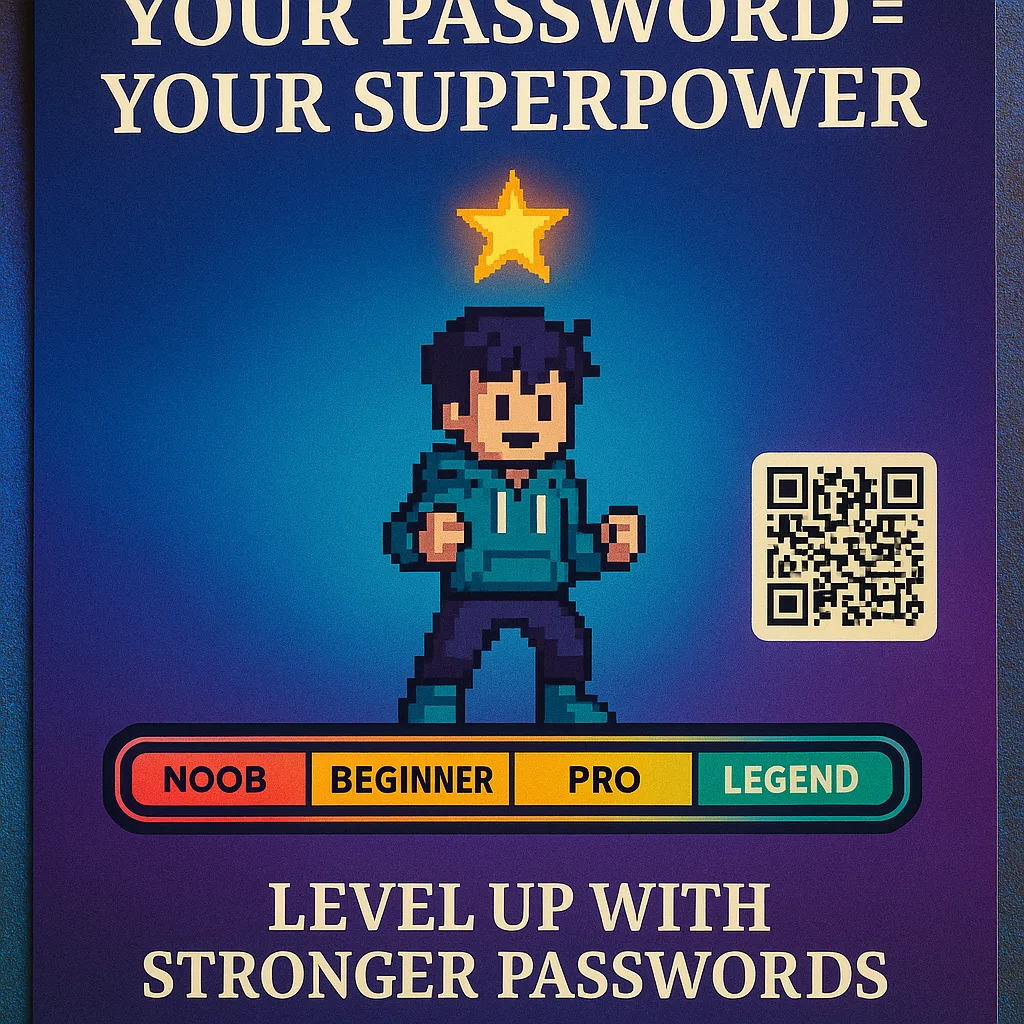
• Gaming-inspired level system for password strength
• Character creation theme for unique passwords
• Achievement badges for security milestones
• Neon color scheme with pixel art elements
Key Message: “Your password is your superpower—level it up!”
Student Feedback: “Finally, something that doesn’t treat us like we’re five. The gaming theme actually makes me want to change my password.” – 7th grader
Design Elements:
• Text message bubble format
• Before/after scenarios
• Emoji-based emotion indicators
• Gradient backgrounds matching app interfaces
Key Message: “Screenshot = Forever. Think twice, type once.”
Student Feedback: “The text bubble design caught my eye because it looks like my actual phone. Made me think about my group chats differently.” – 8th grader
Implementation Strategies Using Poster Machine Maker Technology
Phase 1: Listen
Gather authentic inputStudent Voice Sessions
Host focus groups where students share their online experiences, concerns, and ideas for campaigns. Record key phrases and trending topics they actually use.Phase 2: Create
Co-create with studentsCollaborative Design
Use design software with templates students can customize. Let them choose colors, fonts, and imagery that speaks to their generation.Phase 3: Deploy
Location mattersStrategic Placement
Place campaigns where students naturally gather—not just hallways but cafeterias, locker areas, and near charging stations.Measuring Impact: Data-Driven Digital Citizenship
Track your campaign effectiveness with these student-centered metrics:
Beyond Posters: Creating a Digital Citizenship Ecosystem
The most successful schools use their poster machine maker as the centerpiece of a comprehensive approach. Here’s how to build an ecosystem that reinforces positive digital behaviors:
Morning Announcement Visuals: Create weekly digital citizenship tips displayed during morning announcements. Furthermore, rotating fresh content keeps the message relevant.
Parent Communication Bridge: Design take-home infographics that help parents understand the digital landscape their children navigate. Additionally, bilingual options ensure all families can participate in the conversation.
Peer Educator Programs: Train student leaders to design and present campaigns to younger grades. Subsequently, peer-to-peer education proves 5x more effective than adult-led initiatives.
Response Protocol Posters: Create clear, visual guides for reporting cyberbullying, identifying scams, and seeking help. Moreover, anonymous QR code reporting options remove barriers to getting support.
“The Classroom Pro 24 Poster Maker Elite Package transformed how we approach digital citizenship. We went from generic handouts to dynamic, student-designed campaigns that actually spark conversations. The scanner feature lets us incorporate student artwork, making every campaign feel authentic and relevant.”
Sarah Martinez
7th Grade Technology Teacher, Austin ISD
Pro Tips from the Field
Ready to Create Campaigns That Actually Connect?
Transform your digital citizenship education with visuals that speak your students’ language. Check out our School Poster Maker Comparison to find the perfect fit for your campus.
The digital citizenship conversation isn’t going away—if anything, it’s becoming more critical every day. Therefore, by investing in the right tools and strategies, we can create campaigns that don’t just decorate walls but actually change behaviors. Remember, the most powerful campaigns come from collaboration between educators and students, powered by technology that makes professional-quality design accessible to everyone.
Join the conversation on X using #DigitalCitizenshipDesign and share your successful campaigns! Together, we’re building a generation of thoughtful, responsible digital citizens—one poster at a time. 🎨💻✨